
Best eSIM for South Korea in 2026
A real review and setup guide for staying online across South Korea.

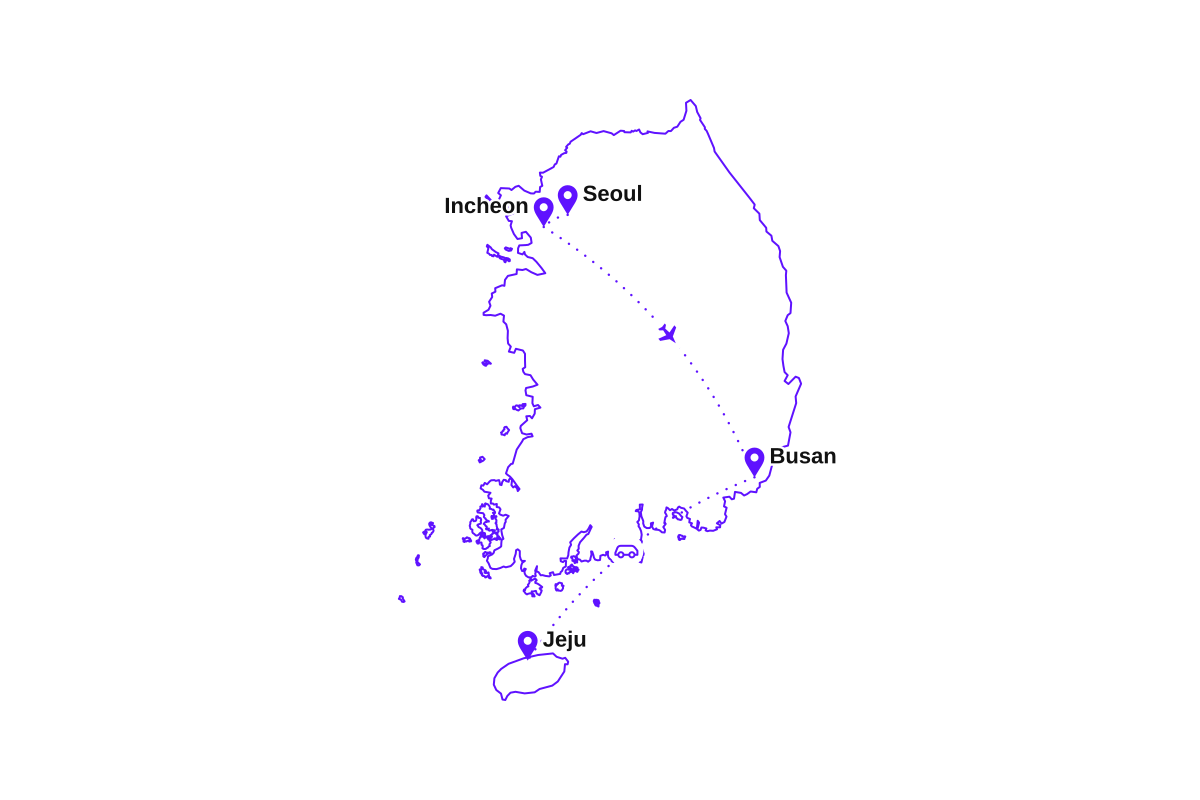
I spent twelve days in South Korea and never once went looking for WiFi. Landed at Incheon, based myself in Seoul for the first week, then took the KTX south to Busan and flew over to Jeju for the last few days, all on a single eSIM.
South Korea is about the easiest place I have ever tried to stay online. It was full 5G in Seoul, Busan, and across Jeju, and the signal held deep in the Seoul subway and on the KTX train running south. I was routed onto SK Telecom, the country's largest network, and the only time it eased back to LTE was up on the Hallasan trails on Jeju. If you have ever fought for signal abroad, Korea feels like cheating.
What I actually used it for
- Calling a KakaoT taxi outside Incheon arrivals before I'd found the airport train.
- Tethering the laptop for a week of work out of cafes in Seoul, hotspot and all.
- Naver Map and Google Maps for the subway, the KTX platforms, and finding my way around Busan.
- Translating menus and signs with the camera, and video calls home from Jeju in the evenings.
How much data do I need?
Set your trip length, tick what you'll do, get a plan size.
You'll be comfortable with 3 GB
Pick your South Korea eSIM plan
Every plan covers all of South Korea on SK Telecom. Install before you fly, top up in the app any time.
🇰🇷South Korea
🇰🇷South Korea
🇰🇷South Korea
🇰🇷South Korea
🇰🇷South Korea
🇰🇷South Korea
🇰🇷South Korea
🇰🇷South Korea
Which plan fits your trip to South Korea?
Match it to your itinerary. Running low in South Korea is a two-tap top-up, never a new eSIM.
Long weekend in Seoul
- City maps and cafes
- WhatsApp and social
- A few video calls
One to two weeks
- Seoul, Busan, and Jeju
- Day trips and navigation
- Daily calls home
A month in Korea
- A full month online
- Remote work and uploads
- Room to spare
Nomad or hotspot user
- Heavy daily data
- Laptop over hotspot
- Long stays
Buy with confidence
30-day money-back guarantee
Full refund within 30 days. No questions asked.
24/7 support
Real humans via website or email, weekends included.
Instant delivery
In your dashboard right after checkout.
Why travelers carry an eSIM in South Korea
Runs on SK Telecom
We route through SK Telecom, South Korea's largest network, not a budget reseller.
Some of the fastest 5G anywhere
Korea has one of the most built-out 5G networks in the world, and you feel it in the cities.
Online the moment you land
Call a KakaoT taxi and open maps at Incheon airport without hunting for WiFi.
Signal underground and at speed
Solid data deep in the Seoul subway and on the KTX train running south to Busan.
Cheaper than roaming
Coming from outside Korea, a full eSIM plan often costs less than a single day of carrier roaming.
Keep your home number
Keep your number for verification texts and calls while the eSIM does the heavy lifting in South Korea.
Coverage from Seoul to Jeju
Strong 4G and 5G across the cities, the transit system, and the islands. What to expect on the ground:
- 5G / 4GSeoul & IncheonFull 5G across the capital region
- 5G / 4GBusan & the KTX lineStrong 5G on the high-speed train south
- 5G / 4GJeju Island5G across the resort island
- 4G*Hallasan & national parksSolid at the trailheads, patchy on high trails
SK Telecom runs one of the most complete 5G networks in the world, reaching nearly every populated part of the country, the subway, and the high-speed rail. Only high mountain trails and a few remote islands drop to 4G, the same as they do for any local SIM.
Before you fly: a ten-minute checklist
Do these five things before departure and the first hour in South Korea takes care of itself:
- Set up the eSIM on your home connection and double-check the new line is listed before the flight to Seoul.
- Download Naver Map or Kakao Map. Google Maps has limited directions in Korea, and these are what locals use.
- Install KakaoT for taxis and Papago for translation, so both are ready before you land.
- Save your accommodation address in Korean, and note that a T-money transit card is easy to grab at any convenience store.
- Pack a power bank. A day of maps, translation, and photos drains a battery faster than usual.
How to set up your South Korea eSIM
The whole flow takes about two minutes. Do it on home WiFi before you fly and arrive in South Korea already connected.
- 1
Buy a South Korea plan
Buy the size that fits, from a weekend to a month in South Korea. Delivery is instant, straight to your email and dashboard.
- 2
Scan the QR code at home
Tap Activate in the dashboard and point your camera at the QR code before leaving for Seoul. Setup takes about a minute.
- 3
Turn on Data Roaming when you land
Land at Incheon, switch Data Roaming on for the eSIM line, and you are online before you reach the baggage belt. This is the step most people miss.
- 4
Top up any time during your stay
Add more data any time from the app, whether you are in Seoul or out in the countryside. Same eSIM, no new QR code.
Install at home, and when you touch down in South Korea, turn on Data Roaming for the eSIM line. It is required and completely free.
Does my phone support eSIM?
Type your phone model and get the answer in two seconds.
How eSIMPal compares to other South Korea eSIM providers
See how we stack up against the competition. We're the only provider offering no-questions-asked refunds.
| Feature | Best valueeSIMPal | Airalo | Saily | Holafly |
|---|---|---|---|---|
| Price (1GB) | $3.90 | $4.90 | $4.90 | $6.90 |
Easy to use | ||||
24/7 Support | ||||
One eSIM for all destinations | ||||
Reusable eSIM | ||||
No questions asked refund | ||||
Suitable for families |
*Prices shown are for 1GB plans. Features and pricing may vary. Last updated based on public information.
Frequently asked questions
Everything you need to know before your trip to South Korea.
Ready for South Korea?
Pick a plan, install your eSIM in minutes, and arrive in Seoul already connected.