
Best eSIM for Mexico in 2026
A real review and setup guide for staying online across Mexico.

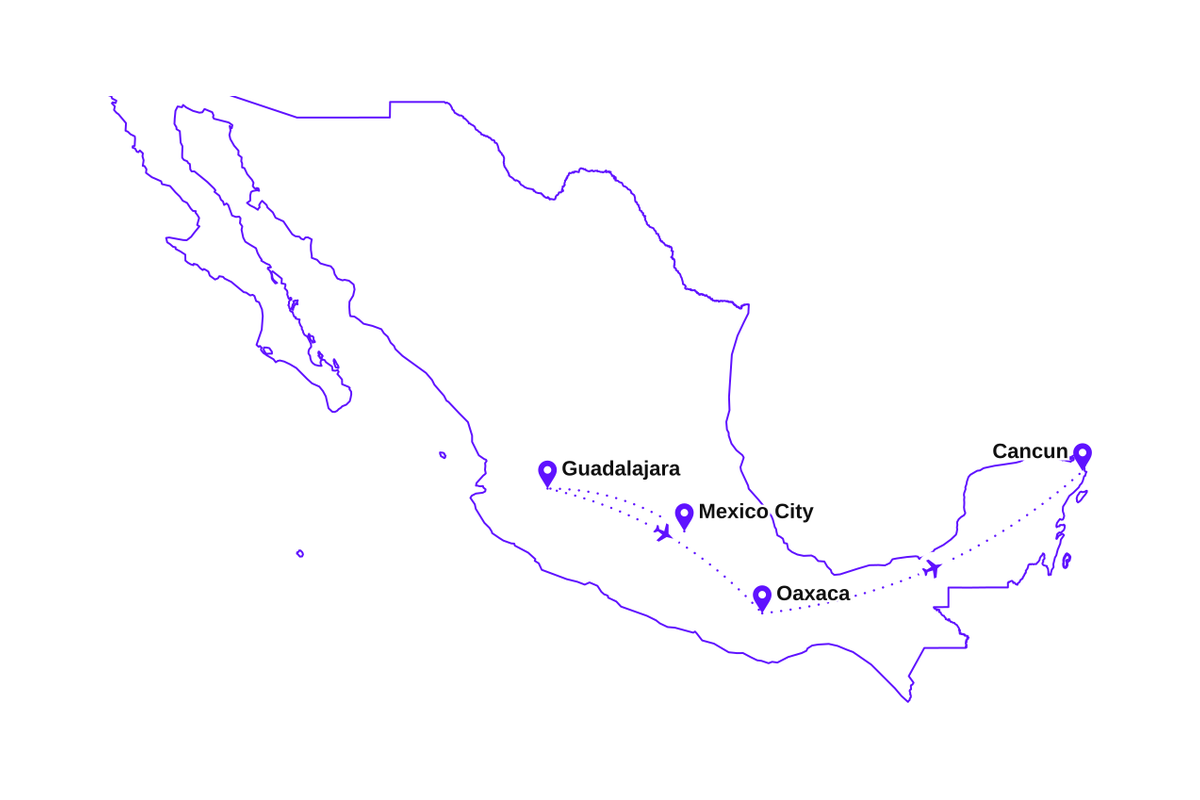
I spent two weeks in Mexico on a single eSIM, moving around the whole time. A few days in Mexico City to start, then over to Guadalajara, down south to Oaxaca for the food and the mezcal, and finally out to Cancun and the Caribbean coast.
Mexico City, Guadalajara, and Cancun gave me strong LTE nearly everywhere, with 5G showing up here and there in the capital. The eSIM rides on Movistar and the Altan shared network, where 4G is the workhorse, so I planned around LTE and it held. Down in Oaxaca and on the long stretches between towns it dipped to 3G a few times and always recovered near the main roads.
What I actually used it for
- Ordering an Uber from Mexico City airport before I'd even cleared the terminal.
- Maps across Mexico City, then lane guidance driving out to the ruins at Teotihuacan and Monte Alban.
- Google Translate on menus and market stalls when my Spanish ran short.
- Uploading photos and video calls home from a rooftop in Oaxaca in the evenings.
How much data do I need?
Set your trip length, tick what you'll do, get a plan size.
You'll be comfortable with 3 GB
Pick your Mexico eSIM plan
Every plan covers all of Mexico on the top local networks. Install before you fly, top up in the app any time.
🇲🇽Mexico
🇲🇽Mexico
🇲🇽Mexico
🇲🇽Mexico
🇲🇽Mexico
🇲🇽Mexico
🇲🇽Mexico
🇲🇽Mexico
Which plan fits your trip to Mexico?
Match it to your itinerary. Running low in Mexico is a two-tap top-up, never a new eSIM.
Layover or long weekend
- City maps and rides
- WhatsApp and social
- A few video calls
One to two weeks
- Cities and the coast
- Day trips and navigation
- Daily calls home
A month or a grand tour
- Cities, coast, and ruins
- Hotspot and uploads
- Room to spare
Remote work or long stay
- Heavy daily data
- Laptop over hotspot
- Long stays
Buy with confidence
30-day money-back guarantee
Full refund within 30 days. No questions asked.
24/7 support
Real humans via website or email, weekends included.
Instant delivery
In your dashboard right after checkout.
Why travelers carry an eSIM in Mexico
No surprise roaming bills
Visiting from the US or Canada? Roaming in Mexico adds up fast. An eSIM is one fixed, known cost for the whole trip.
Runs on Movistar and Altan
We route through Movistar and Altan's shared national network, two of Mexico's largest, not a budget reseller.
Online the moment you land
Order an Uber and open maps at Mexico City or Cancun airport without hunting for airport WiFi.
Keep your home number
Keep your number for verification texts and calls while the eSIM does the heavy lifting in Mexico.
Connected on the coast
Stay online across the Riviera Maya, from Cancun down to Playa del Carmen and Tulum.
Instant delivery
Delivered by email right away, so you can set it up tonight and fly to Mexico City tomorrow.
Coverage from Mexico City to the Riviera Maya
Here is the honest picture of coverage across Mexico, from the capital to the quiet corners:
- 4G LTEMexico City & aroundFast LTE across the capital and the valley, 5G in patches
- 4G LTEGuadalajara & MonterreyStrong LTE across the big cities
- 4G LTECancun & the Riviera MayaSolid across Cancun, Playa del Carmen, and Tulum
- 4G*Oaxaca, Chiapas & the sierraFast 4G on the main routes, patchy on remote mountain roads
Coverage stays strong across the cities, the coast, and the main routes between them, with fast LTE as the everyday layer and 5G in patches of the capital. Deep in the sierra of Oaxaca and Chiapas, expect the signal to ease off on remote roads, the same as it does for any local SIM.
Before you fly: a ten-minute checklist
Do these five things before departure and the first hour in Mexico takes care of itself:
- Set up the eSIM on your home connection and double-check the new line is listed before the flight to Mexico City.
- Download offline Google Maps for Mexico City and any regions you plan to visit.
- Install Uber and DiDi so a ride is one tap away the moment you land.
- Note your accommodation details somewhere offline; arrival in Mexico is smoother with them one tap away.
- Pack a power bank. Maps, photos, and long travel days drain a battery faster than usual.
How to set up your Mexico eSIM
The whole flow takes about two minutes. Do it on home WiFi before you fly and arrive in Mexico already connected.
- 1
Buy a Mexico plan
Buy the size that fits, from a weekend to a month in Mexico. Delivery is instant, straight to your email and dashboard.
- 2
Scan the QR code at home
Tap Activate in the dashboard and point your camera at the QR code before leaving for Mexico City. Setup takes about a minute.
- 3
Turn on Data Roaming when you land
Land in Mexico City or Cancun, switch Data Roaming on for the eSIM line, and you are online before you reach the baggage belt. This is the step most people miss.
- 4
Top up any time during your stay
Add more data any time from the app, whether you are in Mexico City or out in the countryside. Same eSIM, no new QR code.
Install at home, and when you touch down in Mexico, turn on Data Roaming for the eSIM line. It is required and completely free.
Does my phone support eSIM?
Type your phone model and get the answer in two seconds.
How eSIMPal compares to other Mexico eSIM providers
See how we stack up against the competition. We're the only provider offering no-questions-asked refunds.
| Feature | Best valueeSIMPal | Airalo | Saily | Holafly |
|---|---|---|---|---|
| Price (1GB) | $3.90 | $4.90 | $4.90 | $4.90 |
Easy to use | ||||
24/7 Support | ||||
One eSIM for all destinations | ||||
Reusable eSIM | ||||
No questions asked refund | ||||
Suitable for families |
*Prices shown are for 1GB plans. Features and pricing may vary. Last updated based on public information.
Frequently asked questions
Everything you need to know before your trip to Mexico.
Ready for Mexico?
Pick a plan, install your eSIM in minutes, and arrive in Mexico City already connected.