
Best eSIM for Uzbekistan in 2026
A real review and setup guide for staying online across Uzbekistan.

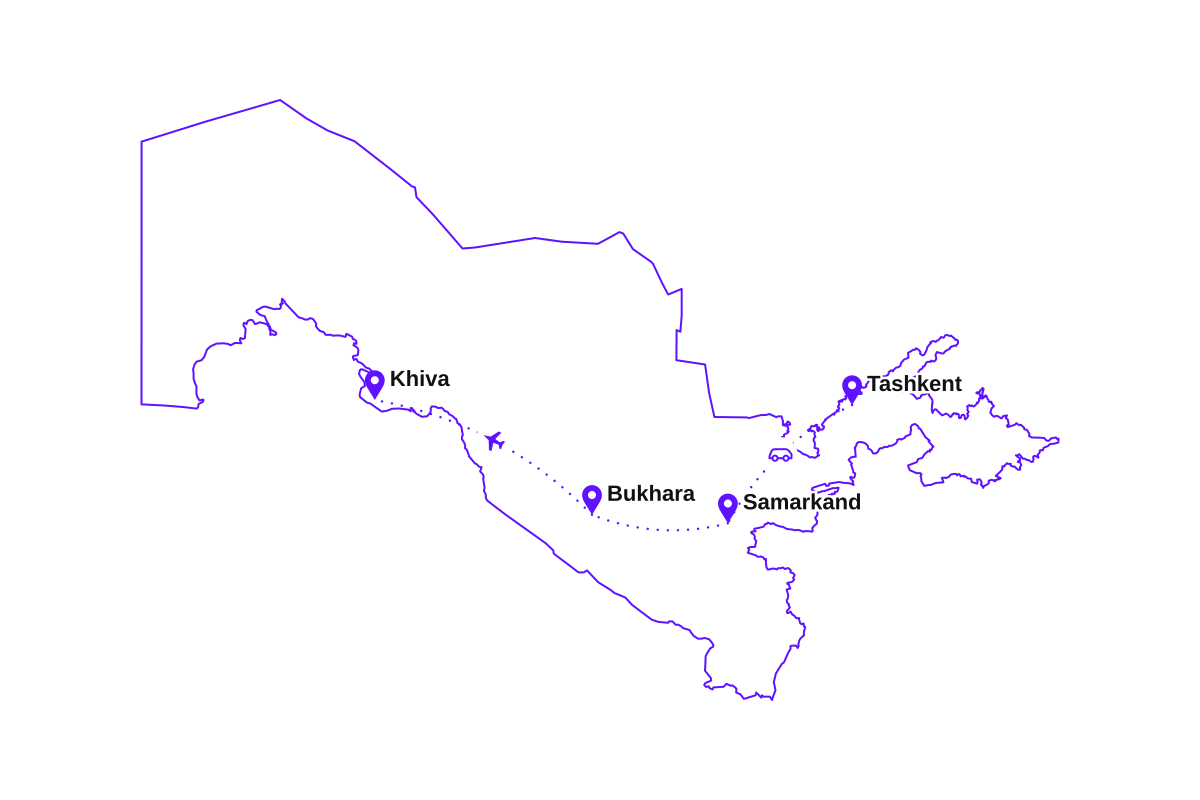
The Silk Road, but on a phone. I ran the classic loop west out of Tashkent: the blue domes of Samarkand's Registan, a few slow days in Bukhara's old town, then the long desert haul to the walled city of Khiva. Ten days on one eSIM.
The network your phone latches onto is Beeline, and in the cities the 4G was quick and dependable. There is no real 5G yet, and you honestly do not miss it. It held through Tashkent, Samarkand, and Bukhara and along the fast Afrosiyob train line, and only thinned where you would expect: the empty Kyzylkum desert road to Khiva, where the bars dropped for a stretch and came back near the next town.
What I actually used it for
- Booking a Yandex Go from Tashkent airport before I had even found the exit.
- Tethering the laptop for a couple of work mornings from a courtyard hotel in Bukhara.
- Maps and offline navigation on the Afrosiyob train and the desert road out to Khiva.
- Translating menus and Telegram messages with guesthouse owners, plus evening video calls home from Samarkand.
How much data do I need?
Set your trip length, tick what you'll do, get a plan size.
You'll be comfortable with 3 GB
Pick your Uzbekistan eSIM plan
Every plan covers all of Uzbekistan on the top local network. Install before you fly, top up in the app any time.
🇺🇿Uzbekistan
🇺🇿Uzbekistan
🇺🇿Uzbekistan
🇺🇿Uzbekistan
🇺🇿Uzbekistan
🇺🇿Uzbekistan
🇺🇿Uzbekistan
🇺🇿Uzbekistan
Which plan fits your trip to Uzbekistan?
Pick the closest match. You can top up in the app any time if Uzbekistan keeps you longer.
A few days in Tashkent
- City maps and bazaars
- Telegram and social
- A few video calls
One to two weeks
- Samarkand and Bukhara
- Trains and navigation
- Daily calls home
A month in Uzbekistan
- A full month online
- Remote work and uploads
- Room to spare
Nomad or hotspot user
- Heavy daily data
- Laptop over hotspot
- Long stays
Buy with confidence
30-day money-back guarantee
Full refund within 30 days. No questions asked.
24/7 support
Real humans via website or email, weekends included.
Instant delivery
In your dashboard right after checkout.
Why travelers carry an eSIM in Uzbekistan
Skip the passport registration
A local Uzbek SIM means queuing at a shop with your passport and filling in paperwork. Your eSIM activates online, so you skip the whole errand.
Runs on Beeline
We route through Beeline, one of Uzbekistan's largest networks, so you are on the same towers locals use, not a budget reseller.
Cheaper than roaming
A full Uzbekistan plan usually costs less than a single day of carrier roaming from home.
Keep your home number
Dual SIM keeps Telegram and bank codes on your usual number while the eSIM carries the data.
Online the moment you land
Open Yandex Go and maps at Tashkent airport without hunting for WiFi or a SIM kiosk.
Connected city to city
Solid 4G through Tashkent, Samarkand, and Bukhara, and along the fast Afrosiyob train line between them.
Coverage in Tashkent, Samarkand, and beyond
Fast 4G LTE across the cities and the Silk Road route. Here is how it plays out on the ground in Uzbekistan:
- 4G LTETashkentFast LTE across the capital, 5G appearing in a few spots
- 4G LTESamarkandStrong around the Registan and the old city
- 4G LTEBukhara & KhivaReliable across the old towns and the walled Itchan Kala
- 4G*Kyzylkum desert roadsSignal in the towns, thin on the long empty stretches
Beeline covers the cities and populated valleys well on 4G LTE. On the long desert road across the Kyzylkum between Bukhara and Khiva, expect stretches with few or no bars. Download offline maps before you set out, the same as you would for any local SIM.
Before you fly: a ten-minute checklist
Ten minutes on your sofa save time and stress on arrival. Everything here is easier on home WiFi than in the arrivals hall in Tashkent:
- Install the eSIM on home WiFi and check the new line shows up in settings before you fly to Uzbekistan.
- Download offline Google Maps for Tashkent, Samarkand, Bukhara, and Khiva.
- Install Yandex Go, the main ride-hailing app in Tashkent, so a taxi is one tap away on arrival.
- Install Telegram if you do not already have it. It is how guesthouses, drivers, and tour guides in Uzbekistan reach you.
- Pack a power bank. Long days of maps and photos around the Registan drain a battery faster than at home.
How to set up your Uzbekistan eSIM
The whole flow takes about two minutes. Do it on home WiFi before you fly and arrive in Uzbekistan already connected.
- 1
Buy an Uzbekistan plan
Pick a data size that matches your trip. Your eSIM arrives instantly by email and in your dashboard, with no shipping and no store visit.
- 2
Scan the QR code at home
Open your dashboard, tap Activate, and scan the QR code on home WiFi before you fly. iPhone and Android add the eSIM in under a minute.
- 3
Turn on Data Roaming when you land
Land in Tashkent, switch Data Roaming on for the eSIM line, and you are online before you reach the baggage belt. This is the step most people miss.
- 4
Top up any time during your stay
Staying longer or using more than planned? Add data in the app from anywhere. It attaches to the same eSIM, with nothing to reinstall.
Tip: install on home WiFi before you fly, then switch on Data Roaming when you land in Tashkent. Roaming is how travel eSIMs work and costs nothing extra.
Does my phone support eSIM?
Type your phone model and get the answer in two seconds.
How eSIMPal compares to other Uzbekistan eSIM providers
See how we stack up against the competition. We're the only provider offering no-questions-asked refunds.
| Feature | Best valueeSIMPal | Airalo | Saily | Holafly |
|---|---|---|---|---|
| Price (1GB) | $2.90 | $4.90 | $4.90 | $6.90 |
Easy to use | ||||
24/7 Support | ||||
One eSIM for all destinations | ||||
Reusable eSIM | ||||
No questions asked refund | ||||
Suitable for families |
*Prices shown are for 1GB plans. Features and pricing may vary. Last updated based on public information.
Frequently asked questions
Everything you need to know before your trip to Uzbekistan.
Ready for Uzbekistan?
Pick a plan, install your eSIM in minutes, and arrive in Tashkent already connected.